Custom agents
Beta feature
Tempo is in private beta. Features, limits, and setup steps described here can change between releases. Contact your Skedulo Customer Success Manager to request access to this feature.Out of the box, Tempo reasons about scheduling the way most operations do. A custom agent lets you give Tempo instructions and a tool set specific to your operation. For example, a dispatch assistant that only looks at today’s and tomorrow’s jobs, prefers suggesting resources before allocating, and never cancels a job.
A custom agent is defined by an agent profile: a named specification that starts from one of Tempo’s stock personas and customizes the display name, instructions, tool allowlist, and optionally model routing and knowledge sources. In other words, an agent profile is a configuration record, not code. Profiles are versioned and move through three states: draft, published, and archived (an earlier published version, replaced by a newer one).
You create a custom agent in one of two ways:
- As a
CustomAgentartifact, deployed with the Skedulo CLI and shipped in packages. This is the recommended path, because the agent lives in source control and moves between tenants like any other artifact. - In the Agent Builder page of the Skedulo web app, for quick experiments and for testing a draft in a chat before publishing it.
Once published, a profile is live for the whole tenant:
- In the Tempo inbox and chat, Tempo discovers published agents and delegates work to them when a request matches the agent’s role.
- Developers can call the agent directly for a single-shot answer, bypassing Tempo’s general supervisor.
Guardrails are not part of a profile. By default, every tool that writes to Skedulo pauses for a person to approve, whatever the profile says, and the platform manages those rules centrally. There are three exceptions. An administrator can allow Tempo to do more for a kind of task in Tempo’s settings; see How much Tempo does. An automation that runs Tempo headlessly with the Run AI Agent action does not pause; see Create Tempo tasks from automations. A direct call to a published agent does not pause either; see Call a published agent directly. A profile that tries to set a guardrails key, or any other unknown key, is rejected.
Before you start
- Enable Tempo in the tenant.
- The user creating profiles needs the
skedulo.tenant.ai.agent.adminpermission. Using a published agent in the inbox or chat needs only the standard Use AI Agent permission. Calling one directly also needsskedulo.tenant.ai.agent.automation; see Call a published agent directly. - Install the Skedulo CLI and authenticate it against the tenant.
The profile specification
| Field | Required | Description |
|---|---|---|
name |
Yes | The stable key for the agent within the tenant. Lowercase letters, digits, and interior hyphens, up to 64 characters. system is reserved. |
displayName |
Yes | The name shown in the Tempo UI. |
template |
Yes | The stock persona the profile starts from: scheduler, admin, or generalist. |
instructions |
Yes | A structured object, not free text, with four fields: role (required), scope, guidance, and negativeBoundaries. Tempo also uses role to decide when to route a request to this agent, so write it as a one-sentence description of what the agent is for. |
tools |
No | An allowlist of tool IDs from the tool catalog. The agent can call only these tools. If you omit the field or leave the list empty, the agent is not restricted: it keeps every tool of its template, including the tools that write. To restrict an agent, list at least one tool. |
model |
No | { "primary": "...", "fallback": "..." } to route this agent to a specific model. Omit it to use the platform default. |
knowledge |
No | References to curated knowledge sources. |
allowedDomains |
No | Only meaningful when external_api is in tools. A list of { "domain": "...", "secrets": [...] } entries naming the hosts the agent may call (an exact host or a *.suffix wildcard) and the configuration variable keys it may use as {{secret:KEY}} against each host. A secret is never usable against a host that does not list it. Hosts that carry secrets must first be approved by Skedulo; contact your Skedulo Customer Success Manager with the host names you need. |
Deploy a custom agent as an artifact
A custom agent is a Skedulo artifact of type CustomAgent. You keep it in source control, deploy it with the Skedulo CLI, and ship it inside a package alongside the custom objects, configuration variables, and automations it depends on. The artifact always represents the published version of the agent.
Note
If thesked artifacts custom-agent commands are missing from your CLI, run sked artifacts update-descriptors to refresh the CLI’s list of artifact types. If they are still missing, contact Skedulo support.
State file
Save the specification as <name>.custom-agent.json:
{
  "metadata": {
    "type": "CustomAgent"
  },
  "name": "dispatch-assistant",
  "displayName": "Dispatch Assistant",
  "template": "scheduler",
  "instructions": {
    "role": "You help dispatchers keep today's schedule healthy.",
    "scope": "Today and tomorrow's jobs in the caller's region.",
    "guidance": "Prefer suggest_resources before allocating.",
    "negativeBoundaries": "Do not cancel jobs."
  },
  "tools": ["search_jobs", "suggest_resources", "allocate_job", "get_current_time"]
}
Deploy
sked artifacts custom-agent upsert -f dispatch-assistant.custom-agent.json -a <alias>
Deploying saves the specification as a draft and then publishes it in one step, because a draft that is never published would have no effect at run time. Publishing validates the specification first; a blocking finding fails the deploy and reports the findings. See Validation.
The published profile takes effect without a release. Requests on the same server instance pick it up immediately; other instances within about 30 seconds. If the profile cannot be loaded for any reason, Tempo falls back to the stock persona rather than failing.
Other operations follow the standard artifact commands:
sked artifacts custom-agent get --name <name>returns the published version. An agent that only has a draft is reported as not found.sked artifacts custom-agent listlists published agents.sked artifacts custom-agent delete --name <name>archives the agent. Tempo stops routing to it immediately. Version history is kept.
Include an agent in a package
Place agent state files in their own folder in the package, for example custom-agents/. See Work with packages.
Within a package, custom agents deploy last. If an agent’s allowedDomains reference configuration variables for secrets, define those variables as ConfigVariable artifacts in the same package, and the deploy order guarantees they exist before the agent is published.
Validation
Publishing runs two tiers of validation on the specification:
- Tier 1 is a set of static checks. Each finding has a code and a severity. The checks are
role_missing,instructions_too_long(the default limit is 8,000 characters across the instruction fields),emphasis_density(too much capitalization or bold emphasis),unknown_allowlist_tool(a tool ID that is not in the catalog),unentitled_allowlist_tool(a tool the tenant is not entitled to),unresolved_tool_reference(the instructions mention a tool that is not on the allowlist),allowed_domain_not_curated(anallowedDomainshost that carries secrets but has not been approved by Skedulo),injection_markeranduntrusted_delimiter_injection(instruction text that tries to override or break out of the platform’s own prompt), andnegation_only_phrasing(instructions made up only of “never” and “do not”). - Tier 2 is a review by a language model. It runs only when Tier 1 has no blocking findings. For quality findings it can suggest a rewrite of the instruction fields, which the Agent Builder shows and which you can apply or ignore.
Fix blocking findings before you deploy again; treat warnings as suggestions.
Create a profile in the Agent Builder
The Agent Builder is a page in the Skedulo web app at /p/agent-builder. It lists the tenant’s profiles, creates a new one from a template, edits the instructions and tool allowlist, validates and publishes the draft, and includes a test chat that runs against the draft before you publish it. Use it to try an agent out, then capture the result as an artifact so that it is under source control.
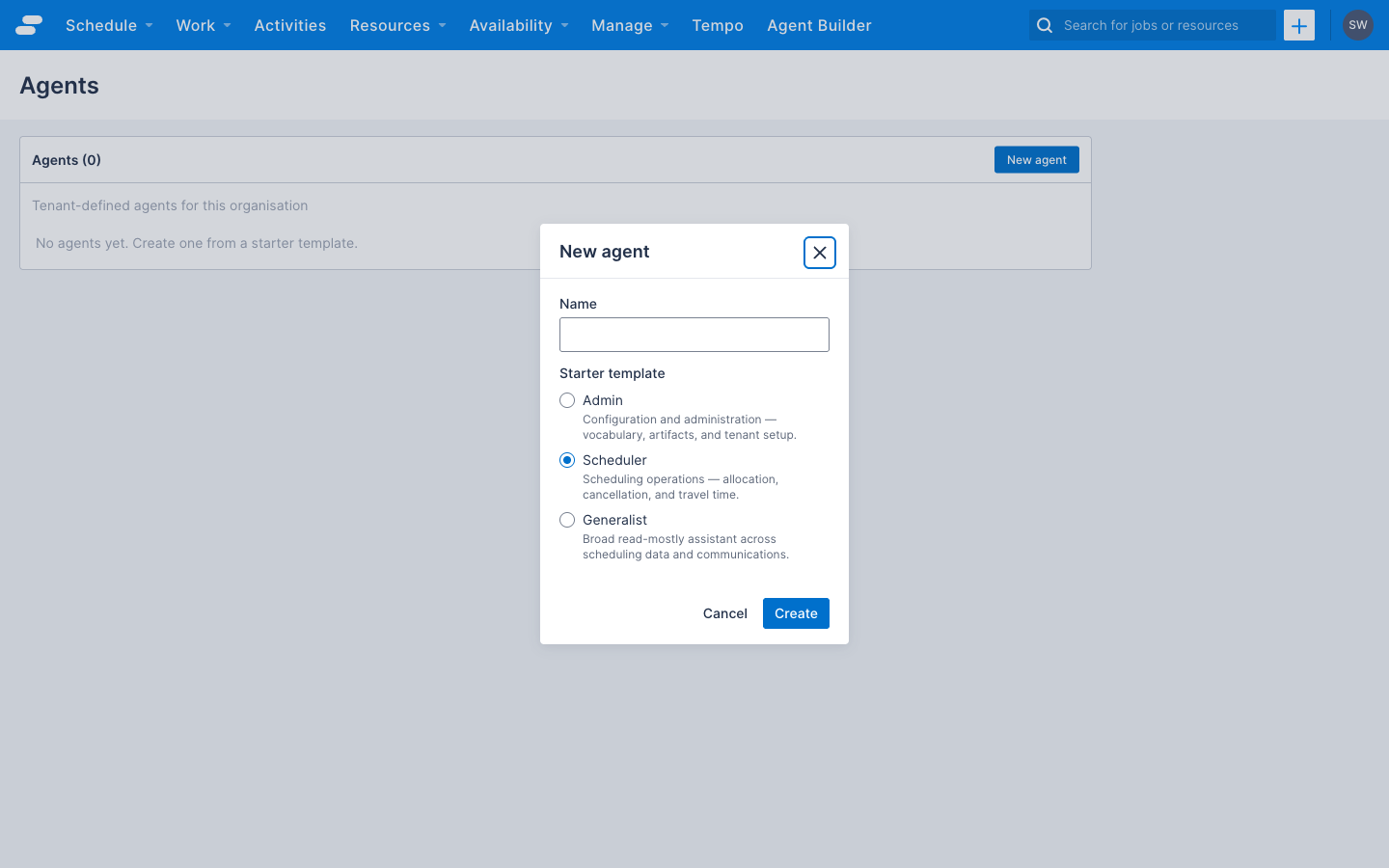
The page is not linked from the navigation menu. To reach it:
- The Agent Builder must be enabled for the tenant. Contact your Skedulo Customer Success Manager to request it.
- Add a navigation menu item with Type set to Link and Destination Link set to
p/agent-builder, following the steps in Enable Tempo in a tenant. Restrict Roles with access to the roles that hold theskedulo.tenant.ai.agent.adminpermission.
To move an agent authored in the Agent Builder into source control, retrieve it with sked artifacts custom-agent get --name <name> and commit the resulting state file.
The tool catalog
The tools allowlist references IDs from a governed catalog. The same catalog validates the allowlist and is enforced at run time, so the Agent Builder’s tool picker and the agent itself cannot disagree.
The Agent tools reference lists every tool in the catalog by domain, with its ID, description, and whether it reads or writes. It is refreshed daily from the live catalog, which is also available at GET https://api.skedulo.com/ai/agents/agent-tools/catalog with a Skedulo API token. The reference lists every tool, but an agent can use only the tools your tenant is entitled to; validation reports any others as unentitled_allowlist_tool.
By default, every tool that writes to Skedulo pauses for a person to approve before it runs. external_api pauses on every call, including reads, because it can send data outside Skedulo. A direct call is different: nothing pauses.
Call a published agent directly
Tempo normally decides when to hand a request to a custom agent. An integration can instead dispatch a published agent directly for a deterministic, single-shot answer:
curl -N -X POST "https://api.skedulo.com/ai/agents/agents/dispatch-assistant/stream" \
  -H "Authorization: Bearer $SKEDULO_TOKEN" \
  -H "Content-Type: application/json" \
  -d '{
    "assistant_id": "dispatch-assistant",
    "input": {
      "messages": [{"type": "human", "content": "Summarize unassigned jobs for today."}]
    }
  }'
Use your region’s API host, for example, https://api.uk.skedulo.com. The response is a text/event-stream. The first metadata frame carries the run_id; messages frames stream the reply, and the final messages frame holds the complete transcript. A direct call has no conversation history: each request is a fresh run of the agent with its instructions and your message. Unknown or unpublished agent names return 404.
Warning
A direct call runs the agent without pausing for a person to approve. If the message asks the agent to change something and its tools allow it, the change happens. For that reason, the token must hold theskedulo.tenant.ai.agent.automation permission as well as Use AI Agent. A token without it gets the same 404 as an unknown agent name, not a 403.
Related information
- Enable Tempo in a tenant
- Create Tempo tasks from automations
- Agent tools reference: every tool an agent can be allowed to call.
- sked artifacts custom-agent: the CLI command reference for this artifact type.
- Work with artifacts
Feedback
Was this page helpful?